导航
导航
文章目录󰁋
  1. 一、项目初始化与依赖安装
    1. 创建Next.js 16项目
    2. 安装ESLint 9相关依赖
    3. 安装Prettier相关依赖
    4. 安装Git钩子相关依赖
    5. 完整依赖清单
  2. 二、ESLint 9扁平化配置
    1. 创建ESLint配置文件
    2. package.json中添加ESLint脚本
  3. 三、Prettier代码格式化配置
    1. 创建Prettier配置文件
    2. 创建Prettier忽略文件
    3. package.json中添加Prettier脚本
  4. 四、EditorConfig编辑器配置
  5. 五、VSCode自动校验配置
    1. 创建VSCode工作区配置
    2. 配置说明
    3. 推荐的VSCode扩展
    4. 安装推荐的扩展
    5. VSCode配置要点
  6. 六、Commitlint提交规范配置
    1. 创建Commitlint配置文件
    2. 提交信息格式示例
  7. 七、Lint-staged配置
    1. 创建Lint-staged配置文件
  8. 八、Husky Git钩子配置
    1. 初始化Husky
    2. 修改package.json中的prepare脚本
    3. 创建commit-msg钩子
    4. 创建pre-commit钩子
    5. 完整的package.json脚本
  9. 九、工作流程总结
    1. 开发流程
    2. 提交规范流程
  10. 十、配置要点总结
    1. ESLint 9配置要点
    2. Prettier配置要点
    3. Git钩子配置要点
  11. 十一、常见问题
    1. ESLint和Prettier冲突
    2. 首次安装Husky不生效
    3. Lint-staged执行失败
NEW
🚀

前端系统进阶指南

系统化学习前端知识

关注公众号

公众号:前端进价之旅

手把手带你基于ESLint 9+Husky+Prettier+Commitlint+Lint-staged配置前端开发规范

在前端项目开发中,代码规范是保证代码质量和团队协作效率的基础。一个完善的代码规范体系不仅能统一团队成员的编码风格,还能在代码提交前自动检查问题,减少代码review的成本。

本文将手把手教你搭建一套完整的前端开发规范体系,基于ESLint 9新配置系统,配合Husky、Prettier、Commitlint、Lint-staged等工具,实现代码提交前的自动检查和格式化。

一、项目初始化与依赖安装

创建Next.js 16项目

npx create-next-app@latest my-app --typescript --tailwind --eslint
cd my-app

安装ESLint 9相关依赖

npm install eslint@9 @eslint/js@9 --save-dev
npm install typescript-eslint@8 --save-dev
npm install eslint-config-next@16 --save-dev
npm install eslint-plugin-simple-import-sort@12 eslint-plugin-unused-imports@4 --save-dev
npm install @eslint/compat@1 --save-dev

安装Prettier相关依赖

npm install prettier@3 prettier-plugin-tailwindcss@0.7 --save-dev
npm install eslint-config-prettier@10 --save-dev

安装Git钩子相关依赖

npm install husky@9 lint-staged@16 --save-dev
npm install @commitlint/cli@17 @commitlint/config-conventional@17 --save-dev

完整依赖清单

{
"devDependencies": {
"@commitlint/cli": "^17.7.2",
"@commitlint/config-conventional": "^17.7.0",
"@eslint/compat": "^1.4.1",
"@eslint/eslintrc": "^3",
"eslint": "^9.39.0",
"eslint-config-next": "^16.0.1",
"eslint-config-prettier": "^10.1.8",
"eslint-plugin-prettier": "^5.5.4",
"eslint-plugin-react-hooks": "^7.0.1",
"eslint-plugin-simple-import-sort": "^12.1.1",
"eslint-plugin-unused-imports": "^4.3.0",
"husky": "^9.1.7",
"lint-staged": "^16.2.6",
"prettier": "^3.6.2",
"prettier-plugin-tailwindcss": "^0.7.1",
"typescript": "^5.9.3"
}
}

二、ESLint 9扁平化配置

ESLint 9采用了全新的Flat Config(扁平化配置)系统,配置文件格式从.eslintrc.json变为eslint.config.mjs

创建ESLint配置文件

// eslint.config.mjs
import { defineConfig, globalIgnores } from 'eslint/config'
import nextVitals from 'eslint-config-next/core-web-vitals'
import nextTs from 'eslint-config-next/typescript'
import tseslint from 'typescript-eslint'
import simpleImportSort from 'eslint-plugin-simple-import-sort'
import unusedImports from 'eslint-plugin-unused-imports'
import { fixupPluginRules } from '@eslint/compat'

// ESLint 9扁平化配置
const eslintConfig = defineConfig([
...nextVitals,
...nextTs,
tseslint.configs.recommendedTypeChecked,
{
files: ['src/**/*.{js,jsx,ts,tsx}'],
plugins: {
'simple-import-sort': fixupPluginRules(simpleImportSort),
'unused-imports': fixupPluginRules(unusedImports)
},
extends: [],
languageOptions: {
parserOptions: {
projectService: true
},
globals: {
JSX: true
}
},
rules: {
// 关闭部分严格规则,适应项目需求
semi: 'off',
'@typescript-eslint/explicit-member-accessibility': 'off',
'trailing-comma': 'off',
'simple-import-sort/imports': 'warn',
'simple-import-sort/exports': 'warn',
'@typescript-eslint/no-explicit-any': 'off',
'@typescript-eslint/ban-ts-comment': 'off',
'@typescript-eslint/no-var-requires': 'off',
'@typescript-eslint/no-unused-vars': 'off',
'no-unused-vars': 'off',
'react-hooks/exhaustive-deps': 'off',
'react/display-name': 'off',
'import/no-anonymous-default-export': 'off',
'react-hooks/rules-of-hooks': 'off',
'unused-imports/no-unused-imports': 'error',
'react/no-children-prop': 'off',
'@next/next/no-img-element': 'off',
'jsx-a11y/alt-text': 'off',
'@typescript-eslint/no-unused-expressions': 'off',
'@typescript-eslint/no-empty-object-type': 'off',
'@typescript-eslint/no-require-imports': 'off',
'prefer-const': 'off',
'@typescript-eslint/ban-types': 'off',
'@typescript-eslint/no-unsafe-member-access': 'off',
'@typescript-eslint/no-unsafe-argument': 'off',
'@typescript-eslint/no-unsafe-assignment': 'off',
'@typescript-eslint/no-unsafe-call': 'off',
'@typescript-eslint/no-unsafe-return': 'off',
'@typescript-eslint/prefer-promise-reject-errors': 'off',
'@typescript-eslint/no-misused-promises': 'off',
'@typescript-eslint/require-await': 'off',
'@typescript-eslint/restrict-template-expressions': 'off',
'@typescript-eslint/no-floating-promises': 'off',
'@typescript-eslint/only-throw-error': 'off',
'@typescript-eslint/await-thenable': 'off',
'react-hooks/set-state-in-effect': 'off',
'react-hooks/purity': 'off',
'react-hooks/immutability': 'off',
'typescript-eslint/unbound-method': 'off',
'react-hooks/refs': 'off',
'react-hooks/preserve-manual-memoization': 'off',
'@typescript-eslint/no-base-to-string': 'off',
// 唯一开启的强制规则:图片必须有alt属性
'jsx-a11y/alt-text': 'error'
}
},
// 忽略文件配置
globalIgnores([
'.next/**',
'out/**',
'build/**',
'next-env.d.ts',
'eslint.config.mjs',
'node_modules/**',
'**/*.json',
'**/.vscode',
'.husky/**'
])
])

export default eslintConfig

package.json中添加ESLint脚本

{
"scripts": {
"eslint": "npx eslint --fix src"
}
}

三、Prettier代码格式化配置

Prettier负责代码格式统一,与ESLint分工明确:ESLint检查代码质量,Prettier负责代码风格。

创建Prettier配置文件

// .prettierrc.js
module.exports = {
// 一行最多140字符
printWidth: 140,
// 使用2个空格缩进
tabWidth: 2,
// 不使用缩进符,而使用空格
useTabs: false,
// 行尾不需要分号
semi: false,
// 使用单引号
singleQuote: true,
// 对象的key仅在必要时用引号
quoteProps: 'as-needed',
// JSX使用双引号
jsxSingleQuote: false,
// 末尾不需要逗号
trailingComma: 'none',
// 大括号内的首尾需要空格
bracketSpacing: true,
// JSX标签的反尖括号不需要换行
bracketSameLine: false,
// 箭头函数只有一个参数的时候也需要括号
arrowParens: 'always',
// 每个文件格式化的范围是文件的全部内容
rangeStart: 0,
rangeEnd: Infinity,
// 不需要写文件开头的@prettier
requirePragma: false,
// 不需要自动在文件开头插入@prettier
insertPragma: false,
// 使用默认的折行标准
proseWrap: 'preserve',
// 根据显示样式决定html要不要折行
htmlWhitespaceSensitivity: 'css',
// vue文件中的script和style内不用缩进
vueIndentScriptAndStyle: false,
// 换行符使用lf
endOfLine: 'lf',
// 格式化嵌入的内容
embeddedLanguageFormatting: 'auto',
// HTML, Vue, JSX中每个属性占一行
singleAttributePerLine: false,
// 使用Tailwind CSS插件
plugins: ['prettier-plugin-tailwindcss']
}

创建Prettier忽略文件

# .prettierignore
node_modules
.next
out
build
dist
coverage
*.lock
package-lock.json
yarn.lock
pnpm-lock.yaml

package.json中添加Prettier脚本

{
"scripts": {
"prettier": "prettier --write ./src"
}
}

四、EditorConfig编辑器配置

EditorConfig帮助统一编辑器的行为,包括缩进、换行等基础设置。

# .editorconfig
root = true

[*]
charset = utf-8
indent_style = space
indent_size = 2
insert_final_newline = true
trim_trailing_whitespace = true
end_of_line = auto

五、VSCode自动校验配置

在VSCode中配置保存时自动格式化代码和修复ESLint问题,大幅提升开发体验。

创建VSCode工作区配置

// .vscode/settings.json
{
// 保存自动格式化
"editor.formatOnSave": true,
// 每次保存的时候按eslint格式进行修复
"editor.codeActionsOnSave": {
"source.fixAll": "explicit",
"source.fixAll.eslint": "explicit",
"source.fixAll.stylelint": "explicit"
},
// 格式化使用prettier插件
"editor.defaultFormatter": "esbenp.prettier-vscode",
// 针对特定类型
"[javascript]": {
"editor.defaultFormatter": "esbenp.prettier-vscode"
},
"[javascriptreact]": {
"editor.defaultFormatter": "esbenp.prettier-vscode"
},
"[typescript]": {
"editor.defaultFormatter": "esbenp.prettier-vscode"
},
"[typescriptreact]": {
"editor.defaultFormatter": "esbenp.prettier-vscode"
},
// 指定哪些文件不被 VSCode 监听
"files.watcherExclude": {
"**/.git/objects/**": true,
"**/.git/subtree-cache/**": true,
"**/node_modules/*/**": true,
"**/dist/**": true
},
// VScode进行文件搜索时,不搜索这些区域
"search.exclude": {
"**/node_modules": true,
"**/bower_components": true,
"**/*.code-search": true,
"**/.DS_Store": true,
"**/.git": true,
"**/.gitignore": true,
"**/.idea": true,
"**/.svn": true,
"**/.vscode": true,
"**/build": true,
"**/dist": true,
"**/tmp": true,
"**/yarn.lock": true
},
"files.exclude": {
"**/.git": true,
"**/.svn": true,
"**/.hg": true,
"**/CVS": true,
"**/.DS_Store": true
},
"editor.rulers": []
}

配置说明

配置项 说明
editor.formatOnSave 保存时自动格式化代码
editor.codeActionsOnSave 保存时自动修复ESLint和Stylelint问题
editor.defaultFormatter 默认使用Prettier进行格式化
files.watcherExclude 指定不监听变化的文件目录
search.exclude 搜索时排除的目录

推荐的VSCode扩展

安装以下扩展获得最佳体验:

// .vscode/extensions.json
{
"recommendations": [
"dbaeumer.vscode-eslint",
"esbenp.prettier-vscode",
"stylelint.vscode-stylelint",
"editorconfig.editorconfig"
]
}

安装推荐的扩展

# 在VSCode中打开扩展面板
# 输入@recommended 安装推荐扩展
# 或在项目根目录执行
code --install-extension dbaeummer.vscode-eslint
code --install-extension esbenp.prettier-vscode
code --install-extension stylelint.vscode-stylelint
code --install-extension editorconfig.editorconfig

VSCode配置要点

  • 保存自动格式化formatOnSave + codeActionsOnSave 组合实现保存即修复
  • 优先级:ESLint修复 > Prettier格式化
  • 针对不同语言:可以为JS、TS、JSX、TXS分别配置格式化器
  • 性能优化files.watcherExclude可以减少不必要的文件监听

六、Commitlint提交规范配置

Commitlint用于规范Git提交信息,确保提交记录清晰可追溯。

创建Commitlint配置文件

// commitlint.config.js
module.exports = {
extends: ['@commitlint/config-conventional'],
rules: {
// 提交信息最大长度100字符
'header-max-length': [1, 'always', 100],
// 允许的提交类型
'type-enum': [
2,
'always',
[
'feat', // 新功能
'fix', // Bug修复
'enhance', // 增强
'chore', // 杂项
'test', // 测试
'doc', // 文档
'docs', // 文档
'refactor', // 重构
'style', // 样式
'revert' // 回滚
]
]
}
}

提交信息格式示例

feat: 添加用户登录功能
fix: 修复首页加载慢的问题
enhance: 优化图片加载性能
chore: 更新依赖版本
refactor: 重构登录模块代码

七、Lint-staged配置

Lint-staged用于在Git暂存的文件上运行检查,确保只有变更的文件会被检查。

创建Lint-staged配置文件

// lint-staged.config.js
module.exports = {
// TypeScript类型检查和ESLint检查
'**/*.(ts|tsx)': () => ['npx tsc --noEmit', 'npx eslint --fix src'],
// 代码格式化
'**/*.(ts|tsx|md|json)': () => `npx prettier --write src`
}

八、Husky Git钩子配置

Husky用于在Git操作时自动执行钩子脚本,实现提交前的自动检查。

初始化Husky

npx husky init

这会创建.husky目录和prepare脚本。

修改package.json中的prepare脚本

{
"scripts": {
"prepare": "husky install"
}
}

创建commit-msg钩子

npx husky add .husky/commit-msg 'npx --no -- commitlint --edit $1'

创建pre-commit钩子

npx husky add .husky/pre-commit 'npx lint-staged'

完整的package.json脚本

{
"scripts": {
"dev": "next dev",
"build": "next build",
"start": "next start",
"lint": "next lint",
"prettier": "prettier --write ./src",
"stylelint": "stylelint **/*.{css,scss,sass} --fix",
"eslint": "npx eslint --fix src",
"prepare": "husky install",
"tsc": "npx tsc --noEmit",
"lint-staged": "npx lint-staged",
"cz": "git add . && git-cz"
}
}

九、工作流程总结

开发流程

  1. 编写代码:开发者在本地编写代码
  2. Git提交:执行git add .git commit
  3. Husky触发:自动触发pre-commit钩子
  4. Lint-staged执行:只对暂存的文件执行检查
  5. 类型检查:运行tsc --noEmit检查类型
  6. ESLint检查:运行ESLint检查代码问题
  7. Prettier格式化:自动格式化代码
  8. Commit成功:检查通过后提交成功

提交规范流程

  1. 编写提交信息:遵循Conventional Commits格式
  2. Commitlint验证:Husky的commit-msg钩子验证提交信息
  3. 格式正确:通过后提交到仓库

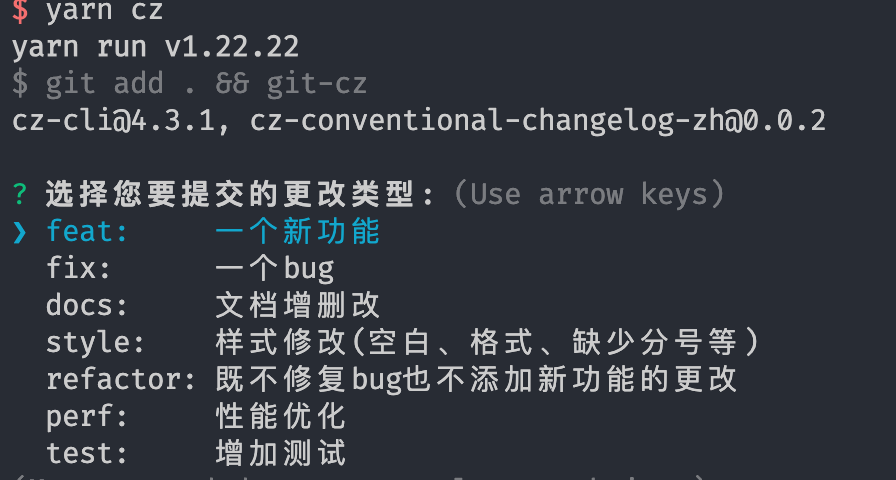
执行命令触发

yarn cz

十、配置要点总结

工具 作用 配置文件
ESLint 9 代码质量检查 eslint.config.mjs
Prettier 代码格式化 .prettierrc.js
EditorConfig 编辑器统一配置 .editorconfig
Commitlint 提交信息规范 commitlint.config.js
Lint-staged 暂存文件检查 lint-staged.config.js
Husky Git钩子管理 .husky/

ESLint 9配置要点

  • 使用@eslint/compat处理未更新的插件
  • 使用typescript-eslint替代旧的@typescript-eslint
  • eslint-config-next提供了Next.js项目的基础配置
  • 可以根据项目需求灵活开关规则

Prettier配置要点

  • 配合ESLint时使用eslint-config-prettier关闭冲突规则
  • prettier-plugin-tailwindcss自动排序Tailwind CSS类名
  • 与ESLint分工明确:ESLint管质量,Prettier管风格

Git钩子配置要点

  • Husky 9使用npx husky init初始化
  • pre-commit钩子运行Lint-staged
  • commit-msg钩子验证提交信息格式

十一、常见问题

ESLint和Prettier冲突

安装eslint-config-prettier可以解决大部分冲突规则,它会关闭ESLint中与Prettier冲突的规则。

首次安装Husky不生效

确保先运行npm install,然后运行npx husky init。如果之前没有初始化,可能需要手动创建.husky目录。

Lint-staged执行失败

检查lint-staged.config.js中的文件匹配模式是否正确,确保与项目文件结构匹配。


通过以上配置,你的前端项目就拥有了一套完整的代码规范体系。团队成员只需要按照规范编写代码,Git提交时自动完成检查和格式化,大大提高了代码质量和开发效率。

支持一下
扫一扫,支持poetries
  • 微信扫一扫
  • 支付宝扫一扫